Last updated
Troubleshooting
Work from the symptom you see. Each section ends with what to check next.
The sidebar does not appear
Check, in order:
- The plugin is active on this site (not only network-installed).
- You are in the block editor, not the classic editor.
- The post type is in scope. On Free that is posts and pages only — custom post types will not show the sidebar.
Next: Editor sidebar, Installation.
No suggestions on a post
Common causes:
- The first index has not finished (or has never run).
- The post is excluded in the context bank.
- There are no eligible candidates for this content.
- Useful candidates were all dismissed (dismissals persist).
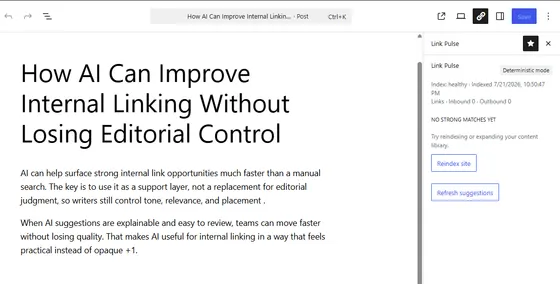
Next: Confirm index status on the dashboard, then review exclusions and dismissals.
Suggestions look irrelevant
Check:
- Structural tags dominating taxonomy — exclude tags that group unrelated content (see Context bank).
- Stale index after large content edits — run a reindex.
- Thin taxonomy on the site — taxonomy is the heaviest signal; sites with almost no shared terms lean on weaker signals (see How ranking works).
Next: Adjust exclusions and taxonomy, then reindex.
Indexing seems stuck
Open the Link Pulse admin and check job status. Restart the job if the UI offers it.
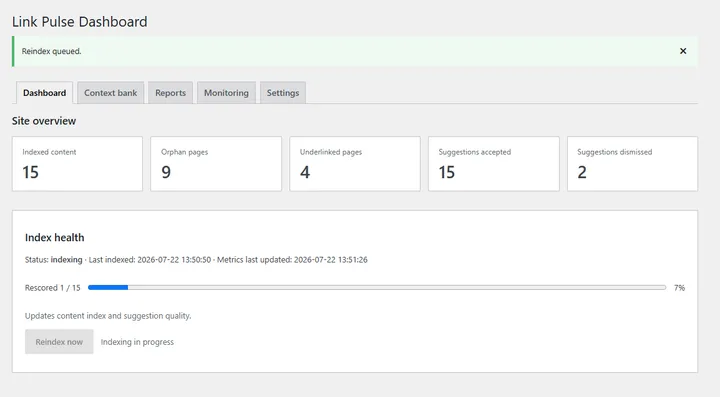
Next: Installation for what a healthy first run looks like.
Indexing is slow
Duration depends on how much published content is in scope and how busy the site is. Indexing runs in the background — it should not block front-end page loads. Let the job finish; use the dashboard status rather than reloading the editor repeatedly.
Next: If status never advances, treat it as stuck (above).
A page shows as orphaned but has links
Possible explanations:
- The inbound links come from excluded content. Links from an excluded source are not counted toward the target’s report status.
- Links were added since the last index — reindex, then reopen reports.
Next: Reports, Context bank.
Reindexing after bulk content changes
After imports, migrations, or large editorial sweeps:
- Run a manual reindex from the Link Pulse admin.
- Use scheduled reindex if you change content regularly and want the index kept current without remembering to click.
Next: Confirm freshness on the dashboard, then spot-check the sidebar on a known post.
Still stuck after these checks? Go to Support.